
Requirements for Real-Time Live Casino Play
 Nathan Williams
Real-time live casino play requires three technical foundations: a stable internet connection, a compatible device, and an updated browser. The quality of the live dealer experience depends on how well these three components perform together. A weak connection causes lag. An outdated browser causes rendering errors. An underpowered device causes frame drops during HD video decoding.
This guide covers the minimum and recommended specifications for each component, provides an 8-step pre-session checklist, and addresses the 5 most common real-time problems with step-by-step solutions. Explore more of our live casino guides to get even more insights into live casino play.
Internet Speed Requirements for Live Casino Games
Internet speed is the single most important technical requirement for live casino play. The stream quality, the responsiveness of the betting interface, and the stability of the connection depend on the bandwidth available between the player's device and the casino's servers. Internet speed is measured in megabits per second (Mbps). Two types of speed matter: download and upload. Download speed determines how quickly the video stream reaches the player's screen. Upload speed determines how quickly the player's actions (bet placements, chat messages) reach the server.
Minimum Internet Speed
The minimum download speed for live casino play is 5 Mbps. This speed supports Standard Definition (SD) streaming at 480p resolution. SD streaming delivers a functional experience. Card values and wheel numbers remain legible at SD resolution. The stream may pixelate during fast camera transitions at this speed.
The minimum upload speed is 1 Mbps. Upload speed below 1 Mbps causes delays in bet placement confirmations and chat message delivery. Delays in bet placement increase the risk of missing the betting window.
Recommended Internet Speed
The recommended download speed for live casino play is 10 Mbps or higher. This speed supports High Definition (HD) streaming at 1080p resolution. HD streaming delivers sharp card values, clear wheel close-ups, and smooth camera transitions without buffering.
The recommended upload speed is 2 Mbps or higher. A 10 Mbps connection also provides a buffer against temporary bandwidth drops. Temporary bandwidth drops occur frequently on shared home networks when other devices stream video or download files simultaneously.
4K streaming is available at selected studios, including Playtech's live casino studios. Playtech's 4K streams require a download speed of 25 Mbps or higher. 4K streaming delivers the sharpest visual detail available in live casino, but consumes significantly more data per hour.
HD vs SD Bandwidth Usage
HD streaming consumes approximately 2.5 to 4 GB per hour. SD streaming consumes approximately 0.7 to 1.5 GB per hour. The difference between HD and SD data consumption directly affects mobile data plans. A single 2-hour HD session uses 5 to 8 GB of data.
Stream quality | Resolution | Download speed needed | Data usage per hour |
|---|---|---|---|
SD (Standard Definition) | 480p | 5 Mbps minimum | 0.7–1.5 GB |
HD (High Definition) | 1080p | 10 Mbps recommended | 2.5–4 GB |
4K (Ultra HD) | 2160p | 25 Mbps recommended | 7–10 GB |
Switch to SD streaming to conserve data if playing on a limited mobile data plan. Switch to HD or 4K if playing on an unlimited home broadband connection.
Device Requirements for Live Casino Play

The device decodes the live video stream, renders the betting interface, and processes the player's inputs in real time. Two categories of devices are used for live casino play: desktop/laptop and mobile/tablet. Both categories require sufficient processing power, RAM, and screen resolution to deliver a smooth experience.
Desktop and Laptop Requirements
Desktop and laptop devices provide the most stable live casino experience. Desktop devices offer larger screens, stronger processors, and wired Ethernet connections. Wired Ethernet connections reduce latency compared to Wi-Fi because the signal travels through a physical cable rather than through radio waves.
Minimum specifications for desktop and laptop live casino play are listed below.
- Processor: Intel Core i3 or equivalent (2.0 GHz or higher)
- RAM: 4 GB minimum
- Screen resolution: 1024 × 768 pixels minimum
- Internet connection: Wired Ethernet preferred
- Browser: Latest version of Chrome, Firefox, Safari, or Edge
Recommended specifications for a smoother HD experience are listed below.
- Processor: Intel Core i5 or equivalent (2.5 GHz or higher)
- RAM: 8 GB
- Screen resolution: 1920 × 1080 pixels (Full HD)
- Internet connection: Wired Ethernet at 10 Mbps or higher
Mobile and Tablet Requirements
Mobile and tablet devices require stable wireless connections and sufficient processing power to decode HD video while running the betting interface. Mobile devices account for a growing share of live casino sessions. Mobile live casino play requires more careful attention to connection stability than desktop play, as wireless connections are inherently less reliable than wired ones.
Minimum specifications for mobile and tablet live casino play are listed below.
- Operating system: iOS 13 or newer, Android 8.0 (Oreo) or newer
- RAM: 3 GB minimum
- Screen size: 5 inches minimum
- Connection: Wi-Fi or 4G/LTE minimum
Recommended specifications are listed below.
- Operating system: iOS 16 or newer, Android 12 or newer
- RAM: 6 GB or higher
- Screen size: 6 inches or larger
- Connection: Wi-Fi 5 (802.11ac) or 5G
Close background apps before starting a live casino session on mobile. Background apps consume RAM and bandwidth. Both resources are more limited on mobile devices than on desktop devices. Closing 3 to 5 background apps typically frees 500 MB to 1 GB of RAM.
Browser and Operating System Compatibility
Most live casino platforms run directly in the browser without requiring a dedicated app. Browser-based live casino play uses HTML5 technology. HTML5 eliminates the need for Flash, Java, or other plugins. HTML5 is supported natively by all modern browsers.
Four browsers are compatible with all major live casino providers.
- Google Chrome (version 90 or newer) provides the widest compatibility with live casino platforms.
- Mozilla Firefox (version 88 or newer) supports all major live casino providers, including Evolution and Pragmatic Play.
- Apple Safari (version 14 or newer) is optimized for iOS and macOS devices.
- Microsoft Edge (version 90 or newer) runs on Chromium and shares Chrome's compatibility profile.
Five operating systems support live casino play.
- Windows 10 or newer
- macOS 11 (Big Sur) or newer
- iOS 13 or newer
- Android 8.0 (Oreo) or newer
- ChromeOS (latest version)
Update the browser to its latest version before starting a live casino session. Outdated browsers cause rendering errors, video lag, and interface glitches. Enable JavaScript in the browser settings. Live casino interfaces require JavaScript to render the betting overlay and chat window. Disable aggressive ad-blocking extensions. Some ad blockers interfere with the live casino chat and betting interface by blocking the scripts that power them.
Technical Requirements Checklist for a Live Casino Play
Complete the following 8-step checklist before starting a live casino session.
- Test the download speed using a speed test tool such as Speedtest by Ookla. Confirm the result is 10 Mbps or higher for HD streaming.
- Connect to a stable network. Use wired Ethernet on desktop devices. Use Wi-Fi 5 or 5G on mobile devices.
- Update the browser to its latest version. Outdated browsers cause video lag, rendering errors, and missed betting windows.
- Close unnecessary background applications. Background apps consume RAM and bandwidth on both desktop and mobile devices.
- Disable VPN connections unless required by the casino operator. VPN routing adds 20 to 100 milliseconds of latency to the stream.
- Enable JavaScript in the browser settings. Live casino betting interfaces and chat windows require JavaScript to function.
- Disable aggressive ad-blocking extensions. Some ad blockers block the scripts that power the live casino overlay.
- Charge the device to at least 50% battery on mobile. Live casino streaming consumes battery at 2 to 3 times the rate of standard browsing due to continuous video decoding and extended screen-on time.
Best Practices for Mobile and Public Network Casino Play
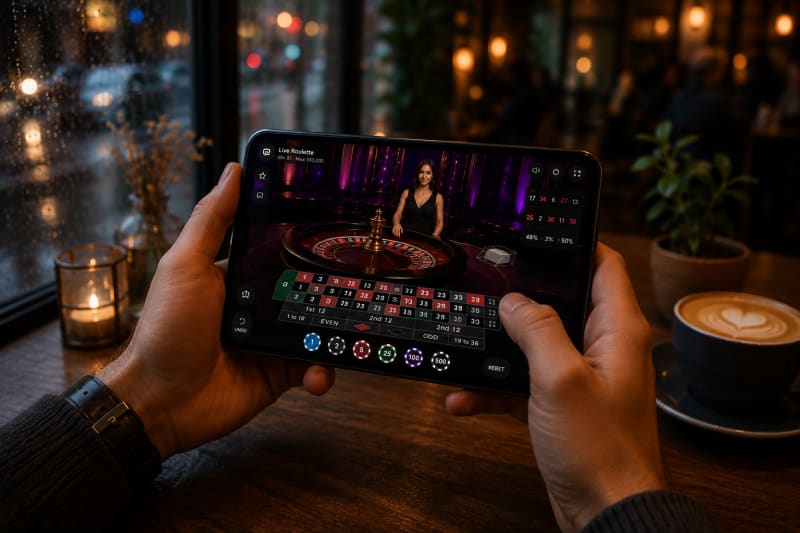
Playing Live Casino on Mobile Data
Mobile data connections support live casino play. 4G/LTE connections deliver 10 to 50 Mbps download speeds in most urban areas. 5G connections deliver 50 to 300 Mbps. Both connection types exceed the 10 Mbps recommendation for HD streaming.
Three best practices apply to mobile data play.
- Switch the stream quality to SD (480p) to reduce data consumption from approximately 3 GB per hour to approximately 1 GB per hour. SD quality preserves data while keeping card values and wheel numbers legible.
- Monitor data usage through the device settings during the session. Set a data usage warning at 80% of the monthly cap to avoid unexpected overage charges.
- Avoid switching between Wi-Fi and mobile data mid-session. Network handoffs cause brief disconnections lasting 2 to 5 seconds. Brief disconnections during a live round may result in a missed betting window or an automatic fold.
Playing Live Casino on Public Wi-Fi
Public Wi-Fi networks introduce two risks: bandwidth instability and security exposure. Public Wi-Fi networks in cafes, airports, and hotels share bandwidth among all connected users. The available speed drops during peak usage hours.
Three best practices apply to public Wi-Fi play.
- Avoid placing high-stakes bets on public networks. Bandwidth drops cause lag during critical betting windows. Lag during a betting window increases the risk of missing the countdown.
- Use a Virtual Private Network (VPN) to encrypt the connection. Public Wi-Fi exposes unencrypted traffic to other users on the same network. A VPN encrypts all data between the device and the VPN server.
- Verify the network name with the staff before connecting. Fake Wi-Fi hotspots mimic legitimate network names. Fake hotspots are a common method for intercepting login credentials and payment information.
Common Real-Time Live Casino Play Problems and Solutions
Five real-time problems occur most frequently during live casino play. Each problem has identifiable causes and specific solutions.
Lag and Buffering
The video feed pauses, stutters, or displays a loading indicator during play. Lag and buffering make accurate bet placement difficult because the betting window countdown continues even when the video freezes.
The cause is insufficient download speed or network congestion. Network congestion occurs when multiple devices on the same network consume bandwidth simultaneously.
- Switch the stream quality from HD to SD in the game settings. SD requires 5 Mbps instead of 10 Mbps.
- Close other devices or applications consuming bandwidth on the same network. Streaming video on a second device reduces available bandwidth by 3 to 5 Mbps.
- Connect via wired Ethernet instead of Wi-Fi. Wired connections eliminate interference from walls, other devices, and signal congestion.
- Restart the router to clear temporary network congestion. Router restarts resolve cached routing issues that accumulate over multi-day uptime.
Disconnections During Play
The connection drops mid-round. The player loses visibility of the game. Disconnections during live casino play trigger automatic timeout protocols at most operators. Timeout protocols resolve the round according to the game's published rules.
The cause is an unstable network, a network handoff between Wi-Fi and mobile data, or an ISP interruption. Network handoffs occur when a mobile device switches from one connection type to another.
- Reconnect to the game within the timeout window. The timeout window is typically 30 to 60 seconds for most operators.
- Check the game history after reconnecting. Bets placed before disconnection are resolved according to the published rules, regardless of whether the player is connected.
- Switch to a more stable connection type. Wired Ethernet is more stable than Wi-Fi. Wi-Fi is more stable than mobile data.
- Contact customer support to confirm the outcome of the round after a mid-round disconnection. Customer support can verify the result through the game's audit trail.
Live Chat Delays
Messages sent through the chat interface take several seconds to appear on screen or reach the dealer. Live chat delays do not affect bet placement or game outcomes. Chat delays affect only the social experience.
The cause is high upload latency or server-side message queuing during peak hours. Peak hours for live casino chat are typically between 19:00 and 23:00 local time.
- Check the upload speed. The minimum for responsive chat is 1 Mbps. Upload speeds below 1 Mbps cause noticeable delays in message delivery.
- Send shorter messages. Shorter messages process faster on the server side.
- Accept minor delays during peak hours. Chat is a secondary function. Chat delays do not affect bet placement timing or game resolution.
Dealing Speed and Seat Availability
Preferred tables are full, or the pace of play feels too fast for comfortable play. Seat availability is limited on standard 7-seat blackjack tables. Dealing speed varies by game variant. Speed Blackjack and Speed Roulette use shortened betting windows of 13 to 25 seconds.
The cause is high player demand during peak hours or the selection of a speed-format variant. Peak demand for popular tables occurs between 19:00 and 23:00 in European and North American time zones.
- Choose unlimited-seat tables such as Infinite Blackjack by Evolution. Evolution's Infinite Blackjack removes the seat availability constraint entirely because all players share the same dealt hand.
- Switch to a standard-pace table. Standard tables use 45 to 60 second betting windows. Standard betting windows provide more time for decision-making.
- Use the lobby filter to sort tables by available seats before joining. The lobby filter displays seat count, betting limits, and current player count for each table.
Running Simultaneous Tables
Playing multiple live tables simultaneously causes interface lag, missed betting windows, and increased data consumption. Simultaneous table play multiplies every technical requirement.
The cause is cumulative bandwidth and processing demand. Each additional HD table requires its own video stream. Each HD stream consumes approximately 2.5 to 4 GB per hour. Two simultaneous HD tables require 20 Mbps. Three require 30 Mbps.
- Limit simultaneous tables to 2 on a standard 10 Mbps connection. Use 3 or more tables only on connections of 25 Mbps or higher.
- Switch all secondary tables to SD quality to reduce total bandwidth consumption. One HD primary table plus one SD secondary table requires approximately 13 Mbps.
- Use a desktop device with a large monitor for multi-table play. Multi-table play on mobile screens increases the risk of misclicks because the betting grids are compressed.
Conclusion
The technical requirements for real-time live casino play are straightforward. A 10 Mbps connection, a modern browser, and a device with 4 GB of RAM meet the recommended baseline for HD streaming.
Complete the 8-step checklist before the first session. Test the connection speed. Update the browser. Close background apps. Charge the device.
Most real-time problems stem from insufficient bandwidth or network instability. Switch to SD quality, connect via Ethernet, or close competing devices on the network to resolve lag and buffering.
The setup takes 5 minutes. The improvement in streaming stability and gameplay smoothness lasts every session after.
Frequently Asked Questions
What internet speed does a live casino require?
Live casino play requires a minimum download speed of 5 Mbps for SD streaming at 480p. The recommended download speed is 10 Mbps or higher for 1080p HD streaming. 4K streaming requires 25 Mbps or higher.
What are the minimum device specs for live casino play?
Desktop devices require an Intel Core i3 processor, 4 GB RAM, and 1024 × 768 screen resolution. Mobile devices require iOS 13 or Android 8.0, 3 GB RAM, and a 5-inch screen minimum.
What causes lag and buffering in live casino games?
Insufficient download speed and network congestion cause lag and buffering in live casino games. Switch the stream quality from HD to SD. Close other devices consuming bandwidth on the same network. Connect via wired Ethernet instead of Wi-Fi.
Is mobile data fast enough for live casino play?
4G/LTE connections deliver 10 to 50 Mbps in most urban areas. 5G connections deliver 50 to 300 Mbps. Both connection types exceed the 10 Mbps recommendation. Avoid switching between Wi-Fi and mobile data mid-session, as network handoffs can cause brief disconnections.
How many live casino tables can I play simultaneously?
Limit simultaneous tables to 2 on a 10 Mbps connection. Use 3 or more tables only on connections of 25 Mbps or higher. Each additional HD table consumes approximately 2.5 to 4 GB per hour. Switch secondary tables to SD to reduce total bandwidth.
How much data does live casino streaming use per hour?
SD streaming consumes 0.7 to 1.5 GB per hour. HD streaming consumes 2.5 to 4 GB per hour. 4K streaming consumes 7 to 10 GB per hour. Switch to SD to conserve data if playing on a mobile data plan.
Which browsers support live casino games?
Google Chrome (version 90+), Mozilla Firefox (version 88+), Apple Safari (version 14+), and Microsoft Edge (version 90+) support all major live casino providers. All four browsers use HTML5 technology. HTML5 eliminates the need for plugins.
What happens during a disconnection in a live casino round?
Bets placed before disconnection are resolved according to the game's published rules. Most operators provide a timeout window of 30 to 60 seconds for reconnection. Check the game history after reconnecting to confirm the round outcome.
Is playing live casino on public Wi-Fi safe?
Public Wi-Fi networks expose unencrypted traffic to other users on the same network. Use a Virtual Private Network (VPN) to encrypt the connection. Verify the network name with staff before connecting, as fake hotspots can mimic legitimate network names.
How do I prepare my device before a live casino session?
Complete 4 steps before every session. First, test the download speed and confirm 10 Mbps or higher. Second, update the browser to its latest version. Third, close unnecessary background applications. Fourth, charge the mobile to at least 50% battery.